Offline Lead Capture: How to Work Trade Shows Without WiFi
· 9 min read
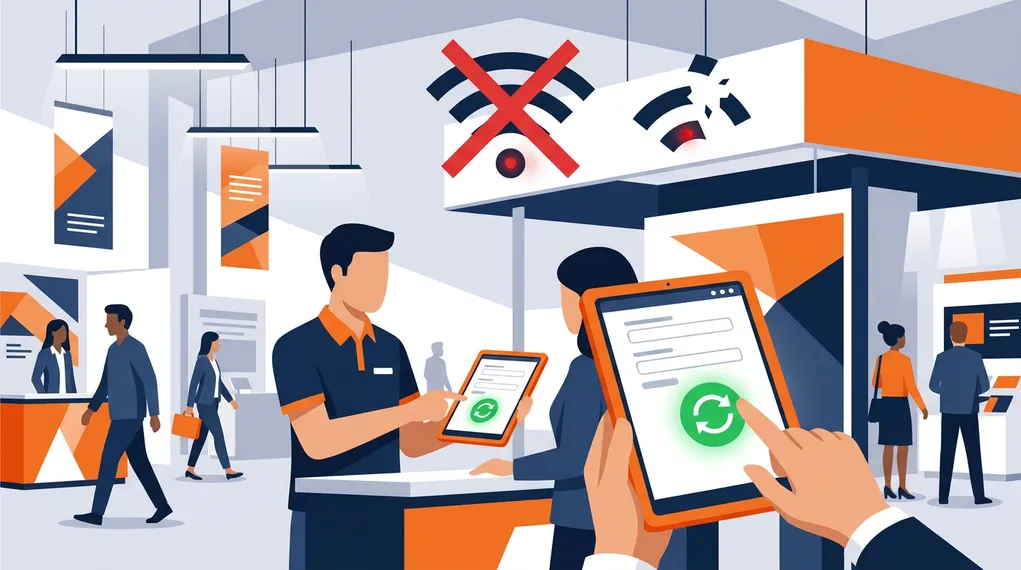
It’s 10:30 AM on day one of a major trade show. Your booth is packed. Your team is capturing leads, scanning badges, recording conversations. Then the WiFi drops.
The event network — shared by 500 exhibitors, 10,000 attendees, and countless livestreams — collapses under the load. Your cloud-based lead capture app shows a spinning loader. The badge scanner times out. Your CRM sync fails silently. For the next 45 minutes, during the busiest window of the event, your team is capturing leads on paper napkins and business cards stuffed into pockets.
This isn’t a hypothetical. It happens at nearly every major trade show.
73%
of exhibitors report significant WiFi issues at trade shows that impact their workflow
CEIR / Exhibitor Magazine
Why Trade Show WiFi Fails
Understanding why event networks are unreliable helps explain why “just connect to WiFi” isn’t a viable strategy.
Massive concurrent usage. A convention center designed for 5,000 simultaneous WiFi connections suddenly hosts 15,000 devices — laptops, phones, tablets, badge scanners, IoT devices, digital signage. The network wasn’t built for this load, and even enterprise-grade access points have connection limits.
Bandwidth contention. Even when connected, bandwidth is shared. Video calls, livestreams, large file uploads, and social media posting consume the available throughput. Your small API call to sync a lead record competes with exhibitors streaming demos and attendees posting to LinkedIn.
Dead zones. Convention centers are large, often concrete structures with metal framing that creates RF interference. Certain booth locations, hallways, and meeting rooms have weak or nonexistent coverage. The WiFi map says you’re covered; your phone disagrees.
Network instability. Even when connected with decent signal, event networks frequently drop connections, switch access points, or throttle bandwidth. A connection that works at 9 AM may degrade as the venue fills up.
Cellular isn’t always better. In dense venues, cellular networks face similar congestion. Thousands of devices in a small area overwhelm cell towers, especially for data-heavy applications. And in underground or heavily shielded venues, cellular signal can be worse than WiFi.
The result: any lead capture workflow that requires a constant internet connection will fail at precisely the moment when you need it most — during peak booth traffic.
What Breaks When You Go Offline
Most lead capture apps are built as cloud-first applications. They assume connectivity and degrade ungracefully when it disappears:
Badge scanning fails. If the scanner needs to verify the badge against a cloud database or upload the image for OCR processing, no connection means no scan. The salesperson reverts to collecting paper cards.
Data doesn’t save. Forms that sync to the cloud on submit simply fail. The salesperson fills out the form, taps save, and gets an error. If they’re lucky, the data is cached locally. If they’re not, it’s gone.
Transcription stops. Live transcription services require a constant stream to the cloud. When the connection drops, transcription stops — mid-sentence. The conversation continues, but the capture doesn’t.
Notes are lost. Voice notes that upload automatically during recording fail when connectivity is interrupted. Depending on the app, the recording may be lost entirely.
Sync corruption. The most insidious failure: the app appears to work but silently fails to sync. The salesperson believes leads are captured, but the data never reaches the CRM. The team discovers the gap hours or days later.
For a comparison of how different tools handle connectivity challenges, see our analysis of NeverDrop vs badge scanners or our side-by-side comparison page.
The 3-Tier Connectivity Model
The right approach to offline isn’t binary — it’s not just “online” or “offline.” Real-world connectivity at events exists on a spectrum, and your tools need to handle the full range.
NeverDrop uses a 3-tier connectivity model that adapts behavior based on actual network conditions:
Tier 1: Online. Full connectivity with good bandwidth. Everything works in real-time: badge scanning with cloud OCR, live transcription streaming, instant enrichment, AI draft generation, email sending, CRM sync. This is the ideal state.
Tier 2: Degraded. Connected but with poor bandwidth, high latency, or intermittent dropouts. The app continues working but adjusts: recording continues locally with upload queued, essential API calls are prioritized, large operations are deferred. The salesperson’s workflow isn’t interrupted.
Tier 3: Offline. No connectivity at all. The app works fully offline: badge scanning captures and stores locally, conversations are recorded and saved to device, notes and instructions are saved locally. Everything is queued for automatic sync when connectivity returns.
The transitions between tiers are automatic and invisible to the user. The salesperson doesn’t need to toggle an “offline mode” or worry about their connection status. The app adapts continuously.
What Works Offline
The critical question isn’t “does the app work offline?” — it’s “what specifically works offline?” Here’s the breakdown:
| Capability | Always-online tools | NeverDrop offline mode |
|---|---|---|
| Badge / card scanning | ✗ (needs cloud OCR) | ✓ (image captured, OCR queued) |
| Contact data entry | ✗ (cloud-only forms) | ✓ (saved locally) |
| Conversation recording | ✗ (streaming required) | ✓ (recorded locally, transcribed later) |
| Voice notes | ✗ (upload required) | ✓ (saved to device) |
| Manual notes & instructions | ✗ (cloud sync required) | ✓ (saved locally) |
| Email enrichment | ✗ | ✓ (queued, auto-triggers on reconnect) |
| AI draft generation | ✗ | ✗ (requires server) |
| Email sending | ✗ | ✗ (requires server) |
| CRM sync | ✗ | ✗ (requires server) |
| Auto-sync on reconnect | ~ (varies by tool) | ✓ (automatic FIFO queue) |
The pattern is clear: everything that captures data works offline. Everything that requires server processing (AI, email delivery, CRM) queues automatically and executes when connectivity returns. The salesperson’s workflow during the conversation is never interrupted.
How Auto-Sync Works
Offline capability is only useful if the data reliably makes it to the cloud when connectivity returns. This is harder than it sounds — naive sync implementations create duplicates, lose data during partial failures, or corrupt records when multiple offline changes conflict.
NeverDrop’s sync queue works as follows:
Persistent queue. Every offline action is written to a persistent local queue (not just in-memory). If the app crashes or the phone restarts, the queue survives.
FIFO processing. When connectivity returns, the queue processes in order — first in, first out. This preserves the chronological order of the salesperson’s actions.
Retry with backoff. If a sync attempt fails (server error, timeout), it retries with exponential backoff — not immediately, which would hammer a recovering network, but gradually: 2s, 4s, 8s, up to 5 minutes between attempts.
Deduplication. Each queued action has a unique identifier. If the same action is somehow queued twice (edge case during connectivity transitions), it’s processed only once.
Status visibility. The app shows the salesperson exactly how many items are pending sync, what they are, and whether sync is in progress. No silent failures, no guessing.
Event Mode: Planning for Bad Connectivity
Some events have notoriously bad connectivity. If you know the WiFi will be unreliable before you arrive, you don’t want your app continuously probing the network and draining battery.
NeverDrop includes an Event Mode toggle in settings that forces the app into offline tier. This means:
- All capture actions work locally with no network attempts
- Battery life is preserved (no background network probing)
- The sync queue accumulates everything
- When you disable Event Mode (e.g., back at the hotel), the app re-evaluates connectivity and begins syncing
Event Mode is a manual override for teams that want to eliminate connectivity uncertainty entirely. It’s the “airplane mode for lead capture” approach.
Tips for Working Events with Poor Connectivity
Even with offline-capable tools, a few practices help maximize your team’s effectiveness:
Pre-brief the team. Make sure every salesperson knows the tool works offline and understands the sync behavior. The worst outcome is a salesperson who doesn’t trust the offline mode and reverts to paper. This is especially important for GDPR compliance — your team should know that offline-captured data is stored securely on-device until sync.
Charge devices fully. Offline mode is easier on battery than constant network retries, but a dead phone is a dead phone. Bring power banks to the booth.
Don’t rely on hotel WiFi for sync. Event hotel networks are often as congested as the venue. If you have a large sync queue, use a mobile hotspot or wait for a stable connection.
Test offline mode before the event. Put your phone in airplane mode and run through the full workflow: scan a badge, record a conversation, add notes. Verify the experience is smooth. Don’t discover issues on the event floor.
Monitor the sync queue. After the event, check that all queued items have synced before assuming the data is in your CRM. Most sync issues are caught automatically by retries, but a quick check ensures nothing fell through.
The Real Cost of Connectivity Dependence
The leads lost during a 45-minute WiFi outage don’t show up in any report. They’re not “lost deals” — they’re deals that never started. The prospect had a good conversation, the salesperson scrambled to write down their details, and by the time the system came back online, the context was gone and the follow-up was generic.
Across a full event, these micro-outages compound. A team that loses 15 minutes of reliable capture per event day, over a 3-day show, has lost nearly an hour of peak booth time. That’s dozens of leads that were partially captured, poorly documented, or simply missed.
The ROI calculation is straightforward: if your lead capture app works 100% of the time regardless of connectivity, you capture 100% of your leads. For the full capture-to-CRM framework — including the five stages where leads die — see our complete guide to event lead capture. If it fails during network outages, you capture whatever your network uptime allows — which at most events is significantly less than 100%.
Offline capability isn’t a nice-to-have feature. At trade shows, it’s the difference between a tool that works and a tool that works when you need it.
Frequently Asked Questions
Yes, with the right tool. NeverDrop works fully offline — you can scan cards, record conversations, take notes, and even transcribe audio locally. Everything syncs automatically when you reconnect.
NeverDrop uses a persistent sync queue. When connectivity returns, it automatically uploads images, triggers OCR, enriches contacts, and syncs to your CRM — in the order actions were taken. You see a progress indicator as items sync.
NeverDrop always records audio regardless of connectivity. Offline recordings are stored locally and transcribed server-side when you reconnect. You get the same speaker-labeled transcript — just with a slight delay.
Never lose a lead to bad WiFi. NeverDrop works offline — scan, record, and follow up from anywhere.
Get Started Free