AI Follow-Up Emails: How Context-Based Drafts Convert 21× Better
· 11 min read
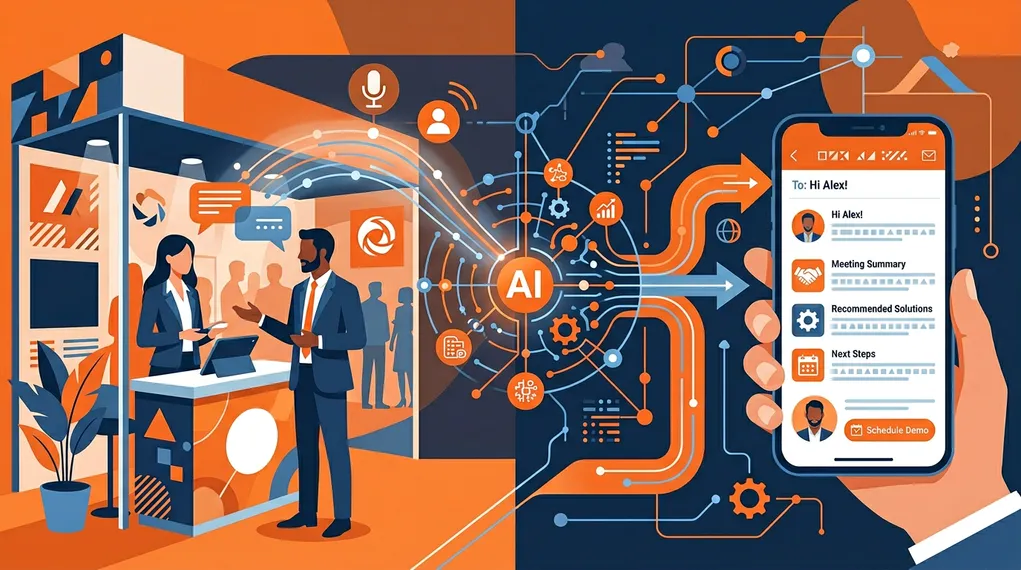
After a trade show, most sales teams send follow-up emails that look like this:
Hi [First Name], it was great meeting you at [Event Name]. I’d love to continue our conversation about how [Company] can help [Their Company]. Would you be available for a quick call next week?
It’s polite. It’s professional. And it gets a 2–5% response rate — because the prospect received the exact same email from every other vendor who scanned their badge.
The problem isn’t that salespeople don’t want to personalize. It’s that personalizing 50–200 follow-ups after a long event day is physically impossible with templates and mail merge. So they default to generic, and generic gets ignored.
AI changes this equation. But not all AI email tools are created equal. The difference between a mediocre AI follow-up and one that converts lies in a single word: context.
The Hierarchy of Personalization
Not all personalization is equal. There are three distinct levels, and each produces dramatically different results.
Level 1: Name Merge
The most basic form — insert the prospect’s first name, company, and event name into a template. Every email marketing tool does this. Every sales team uses it. And every recipient can tell it’s a template within two seconds.
Typical response rate: 2–5%
Name merge fails because it personalizes the wrapper, not the content. “Hi Sarah” feels personal for exactly one word. The rest of the email could have been sent to anyone at the event.
Level 2: Segment-Based Personalization
A step up — write different templates for different segments (by industry, company size, or product interest). The email references the prospect’s vertical or a general pain point for their category.
Typical response rate: 5–10%
Better, but still impersonal. The prospect knows you’re writing to “enterprise SaaS companies with 50+ employees,” not to them specifically. The email demonstrates research, not listening.
Level 3: Context-Based Personalization
The email references what was actually said in the conversation: the specific problem the prospect mentioned, the feature they asked about, the competitor they’re evaluating, the timeline they shared. It reads like a message from someone who was paying attention — because it was generated from the actual transcript of the conversation.
Typical response rate: 15–25%
21×
higher conversion when following up within 5 minutes with a personalized message
Lead Connect / InsideSales.com
The jump from level 1 to level 3 isn’t just about response rates. It’s about the quality of the response. Level 1 emails get polite declines or silence. Level 3 emails get substantive replies: “Yes, let’s discuss the integration you mentioned,” or “I’d like to bring my CTO into the conversation.” The lead enters your pipeline as a qualified opportunity, not a cold contact.
Why Generic Templates Fail
Let’s be specific about why the standard approach doesn’t work.
The prospect can tell. Recipients are sophisticated. They’ve received thousands of sales emails. They can spot a template in under three seconds — and the moment they do, the email is mentally categorized as “mass outreach.” Even if the content is relevant, the format triggers the spam reflex.
There’s no differentiation. If you and three competitors all send a “great meeting you at [Event]” email, you’re competing on brand recognition, not on the quality of the interaction. The vendor who demonstrates that they actually listened has an asymmetric advantage.
No context means no urgency. A generic email gives the prospect no reason to reply today. A context-based email that references “the Q3 deadline you mentioned for replacing your current vendor” creates a natural follow-up thread with built-in urgency.
It wastes the event investment. Your team flew to the event, paid for the booth, spent hours having conversations — and then summarized all of it as “great meeting you.” The ROI collapse isn’t in the event cost; it’s in the follow-up.
How AI Follow-Up Actually Works
When people hear “AI email,” they often imagine ChatGPT generating a cold email from a one-line prompt. That’s not what we’re talking about. The quality of an AI-generated follow-up is entirely determined by the quality of the inputs.
Here’s what NeverDrop feeds into the AI draft:
Conversation transcript — The actual words spoken during the meeting, captured via live transcription or voice note. This is the highest-value input. It contains the prospect’s specific pain points, questions, objections, and priorities — in their own language.
Contact data — Name, company, title, email, phone — all captured from the badge or business card scan and enriched automatically. This ensures the email addresses the right person at the right company with the right context.
Customer profile — Your company’s positioning, value propositions, and typical customer segments. This ensures the AI writes from your perspective, not from a generic sales playbook.
Event-specific instructions — Custom rules for this particular event: tone (formal vs. conversational), specific offers, content to include or avoid, CTA preferences. Different events get different follow-up styles.
Lead-specific instructions — Notes the salesperson adds about this particular lead: “Send the case study about logistics,” “Mention we can do a pilot program,” “They’re currently using [Competitor].”
Instruction hierarchy — Team defaults → personal style → event rules → lead-specific notes. The AI composes all layers, with more specific instructions overriding general ones.
The result is an email that sounds like the salesperson wrote it after careful thought — because it synthesizes everything they know about the prospect, the company, and the event into a single coherent message.
Same Lead, Two Emails: Template vs AI Context
Let’s make this concrete. Same prospect, same event, two approaches.
The prospect: Sarah Chen, VP of Operations at LogiFlow, met at SupplyChain Expo 2026. She mentioned they’re evaluating warehouse automation solutions, frustrated with their current vendor’s lack of API integrations, and need to make a decision by Q3.
Template Email
Hi Sarah,
It was great meeting you at SupplyChain Expo. I’d love to continue our conversation about how we can help LogiFlow streamline operations.
Would you be available for a 15-minute call next week?
Best regards, Marc
AI Context-Based Email
Hi Sarah,
Great speaking with you at SupplyChain Expo today. Your point about the API integration gaps in your current warehouse system resonated — we hear that a lot from operations teams managing multi-vendor environments like yours.
As I mentioned, our platform connects natively with SAP WM and Manhattan Associates via REST API, which would address the integration bottleneck you described. I’ve attached the technical overview we discussed.
Given your Q3 timeline for the vendor decision, would it make sense to schedule a 30-minute technical demo with your engineering team next week? Happy to work around your schedule.
Best, Marc
The first email could have been sent to anyone at the event. The second email could only have been sent to Sarah — it references her specific pain point, her current vendor situation, a concrete solution, and her timeline. It demonstrates listening, not just attendance.
"The best follow-up email is one the prospect couldn't have received from anyone else at the event. That means it has to reference the actual conversation — not just the event badge."
— Field Sales Operations
The Speed × Context Formula
The research on follow-up timing is unequivocal: speed wins. But speed alone produces fast generic emails. Context alone produces thoughtful emails that arrive too late.
The winning formula is speed multiplied by context: a highly personalized email sent within minutes of the conversation. This is what produces the 21× conversion improvement — not speed alone and not personalization alone, but both together.
This is why the workflow matters. If personalization requires 20 minutes of writing per lead, you can either be fast (template) or personal (manual), but not both. AI eliminates this tradeoff: the draft is generated in seconds from rich context, reviewed in 30 seconds, and sent within two minutes. For the complete under-two-minute follow-up workflow, see our step-by-step guide.
Voice Notes: The Context Multiplier
The richest context input isn’t a form field or a dropdown — it’s the salesperson’s own voice. A 30-second voice note captured immediately after a conversation contains more actionable context than any structured form:
- Specific pain points mentioned by the prospect
- Products or features they were most interested in
- Objections or concerns raised
- Competitive context (who else they’re evaluating)
- Next steps agreed upon
- The salesperson’s qualitative read on the opportunity
AI transcribes the voice note and uses it as a primary input for the follow-up draft. The result is an email that reflects the nuance of the conversation, not just the data fields.
For a deeper dive on why voice input outperforms written notes for sales context, read our analysis of voice notes vs written notes for lead capture.
What About Email Templates with AI “Enhancement”?
Some tools take an existing template and use AI to personalize it — swapping in prospect-specific details, adjusting the tone, or adding a relevant paragraph. This is better than pure mail merge, but it’s still fundamentally template-driven.
The limitation is structural: if you start with a template, the AI is constrained by the template’s structure and assumptions. It can personalize the edges, but the core message is still generic.
Context-first AI drafting is different. There’s no template. The AI starts with the conversation transcript and builds the email from scratch, structured around what was actually discussed. The output varies substantially from lead to lead because the input varies — which is exactly what makes it effective. For a look at what templates can do well (and where they fall short), see our trade show follow-up email templates.
Measuring the Difference
If you’re evaluating AI follow-up tools, here are the metrics that matter:
Response rate — What percentage of follow-up emails get a reply? Context-based AI consistently produces 15–25%, compared to 2–5% for templates. Track this by campaign or event.
Reply quality — Not all replies are equal. A “Thanks, not interested” reply is very different from “Yes, let’s schedule a demo.” Context-based emails produce more substantive, sales-advancing replies.
Time to first follow-up — How quickly does the first email go out after the conversation? Under 5 minutes is the gold standard. Under 1 hour is good. More than 24 hours is a pipeline leak. For the research behind these thresholds, see our deep dive on speed to lead.
Pipeline conversion — What percentage of followed-up leads become qualified opportunities within 30 days? This is the metric your revenue team cares about. AI-powered ICP scoring and lead reports can help your team prioritize the highest-value opportunities from the start.
The Bottom Line
The era of “Hi [First Name], great meeting you at [Event]” is over. Prospects are drowning in generic outreach, and the only emails that break through are the ones that demonstrate genuine understanding of their situation.
AI makes context-based personalization possible at scale — but only when the AI has real context to work with. A conversation transcript, a customer profile, event-specific instructions, and lead-specific notes produce a follow-up email that’s indistinguishable from one a thoughtful salesperson would write after 20 minutes of careful drafting. Except it takes seconds.
That’s the shift: from “personalization as data merge” to “personalization as conversation synthesis.” And it converts 21× better. See our lead report feature for how conversation data powers even deeper insights, or visit our comparison page to see how NeverDrop stacks up.
Frequently Asked Questions
AI drafting tools like NeverDrop combine six inputs: conversation transcript, contact data, company profile, event instructions, lead-specific notes, and team instructions. The AI references specific details from your conversation — not just the prospect's name — to create emails that read like you wrote them.
Context-based AI emails significantly outperform generic templates. Emails that reference specific conversation details achieve 15-25% reply rates compared to 2-5% for name-merge templates. The key is the quality of input — voice-captured conversation context produces far better drafts than typed notes.
The minimum is the prospect's name and a few conversation details. The best results come from a full conversation transcript (via voice recording), contact data (from card scan and enrichment), your company profile, and any specific instructions about tone or next steps.
Turn every conversation into a personalized follow-up — in seconds. Try NeverDrop free.
Get Started Free