Why Most CRM Data from Trade Shows Is Garbage (And How to Fix It)
· 11 min read
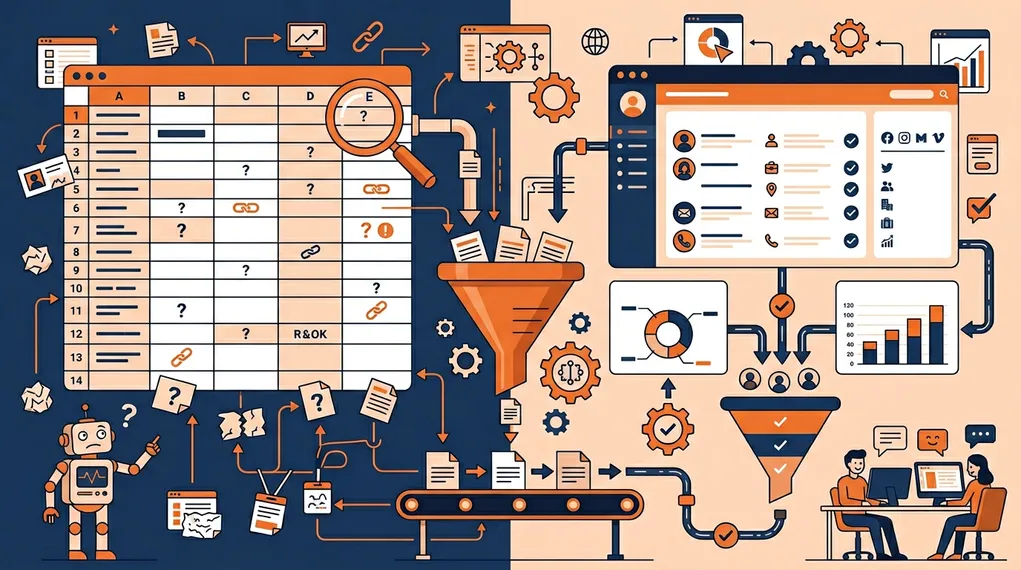
Your team comes home from a trade show with 150 leads. They import them into the CRM. Marketing looks at the data and sees: first name, last name, email, company. That’s it. No conversation notes. No qualification. No context about what was discussed, what the prospect cares about, or what stage of the buying process they’re in.
The sales team looks at the same data and thinks: “I vaguely remember talking to a Sarah from Acme, but I don’t know if she was the one who asked about integrations or the one who was just collecting swag.”
This is the CSV dump problem. It’s the norm, not the exception. And it’s why most trade show leads die in the CRM — not because they’re bad leads, but because nobody has enough information to do anything with them.
40%
of CRM data decays within 12 months — event data decays within days
Gartner Data Quality Research
If general CRM data decays at 40% per year, event data decays in days. The conversation context that makes a lead valuable isn’t in the CRM — it’s in the rep’s memory. And memory has a half-life of hours, not months.
What “Garbage” CRM Data Looks Like
Let’s be specific about what enters the CRM after a typical trade show:
The bare-bones record: Name, email, company, maybe a title. Sourced from badge scan data or a CSV export. No notes. No qualification. No indication of whether this was a 30-second booth drive-by or a 15-minute deep conversation.
The generic tag: “Trade Show Lead” or “Met at Event XYZ.” This tells sales nothing about priority or next steps. When a rep has 50 leads tagged “Trade Show Lead,” they’re all equally unactionable.
The incomplete record: Half the fields are empty. Phone number missing. Title abbreviated. Company name misspelled. The badge scanner captured what was on the badge — which was whatever the attendee entered during registration three months ago.
The context-free duplicate: The prospect already exists in the CRM from a previous touchpoint. The event scan creates a duplicate with less data than the original. Now there are two records, neither with the event conversation context.
The Five Data Quality Killers
| Quality Killer | Garbage CRM Data | Enriched CRM Data |
|---|---|---|
| Contact info | Name + email only, often incomplete | Full contact: name, title, email, phone, LinkedIn, company |
| Conversation context | None — no notes, no transcript | Full conversation transcript from voice recording |
| Qualification | No warmth tag or generic 'event lead' | Hot/warm/cold with specific qualifying criteria met |
| Follow-up status | Unknown — maybe sent, maybe not | Personalized email sent within minutes, tracked in CRM |
| Data entry timing | Days after the event, from memory | Captured in real time during the conversation |
Killer 1: Manual Entry Errors
Human data entry at trade shows has an error rate of 15–25%. Typos in email addresses, misspelled company names, wrong titles, transposed phone numbers. And these aren’t random errors — they’re systematic. When a rep is trying to type on a phone while standing in a loud booth between conversations, accuracy drops.
Every bad email address is a follow-up that bounces. Every misspelled company name is a CRM search that fails. Every wrong title is a personalization attempt that backfires.
The fix: OCR-based capture (badge scan, card scan) that reads the data directly instead of relying on human typing. Error rates drop from 15–25% to under 3%.
Killer 2: Missing Context
This is the most damaging data quality killer because it’s invisible. The CRM record looks complete — all the fields are populated — but it’s missing the one thing that makes the lead actionable: what was discussed.
Without conversation context, sales can’t prioritize. Was this a serious buyer or a casual browser? Can’t tell from the CRM record. Can’t personalize the follow-up. Can’t reference the specific challenge the prospect mentioned. Can’t differentiate your outreach from every other exhibitor who scanned the same badge.
The fix: voice transcription captured at the point of conversation. A 30-second voice note produces a transcript that captures pain points, questions asked, next steps agreed on, and buying signals. This context travels with the lead into the CRM and informs every subsequent touchpoint.
Killer 3: No Qualification
When every lead enters the CRM with the same generic tag, the sales team has no way to prioritize. The hot prospect who asked for a demo next week is sitting in the same list as the student who wanted a branded pen.
Without qualification, sales either treats every lead the same (wasting time on cold leads) or cherry-picks based on company name and title alone (missing warm leads from unexpected segments).
The fix: qualify during the conversation, not after. Tag leads as hot, warm, or cold based on defined criteria that the team agreed on before the event. The qualification data should enter the CRM alongside the contact data — automatically.
Killer 4: Duplicate Records
Event leads frequently create duplicates. The prospect already exists in the CRM from a web form, a previous event, or a colleague’s outreach. The badge scan creates a new record because the email doesn’t match (personal vs. work email) or the name is formatted differently.
Now there are two records, neither complete. The original has the previous history but no event context. The new one has the badge data but no history. The rep who calls the prospect knows half the story.
The fix: automatic CRM sync that deduplicates on import. When a lead is captured at an event and synced to the CRM, the system should check for existing records by email, name, and company — and merge rather than create.
Killer 5: Delayed Entry
Every hour between the conversation and the CRM entry degrades data quality. At the booth, the rep remembers exactly what was discussed. Two hours later, they remember the highlights. The next day, they remember the gist. Three days later, when they finally sit down to import the CSV, they remember… a name and a vague feeling.
The notes they write at day three are thin, generic, and often wrong. “Seemed interested in our platform” isn’t actionable context. It’s a placeholder for a memory that’s already gone.
The fix: real-time capture and sync. The moment a badge is scanned and a voice note is recorded, the data — contact info, conversation transcript, qualification, follow-up email — syncs to the CRM. No CSV. No batch import. No memory decay.
Why Garbage Data Kills Conversion
Bad CRM data doesn’t just make sales harder. It makes sales structurally impossible for a significant portion of event leads.
Sales Can’t Prioritize
When every lead looks the same in the CRM, reps default to the easiest heuristic: sort by company size and call the biggest names first. This means small-but-ready prospects get ignored and large-but-unqualified companies get attention they don’t need.
Priority should come from buying signals observed during the conversation — not from a LinkedIn search three days later.
Sales Can’t Personalize
A follow-up email that says “It was great meeting you at [Event]” tells the prospect that you don’t remember the conversation — or that you’re using a template. Neither builds trust.
Personalization requires context: the specific problem they mentioned, the product feature they asked about, the timeline they shared. If that context isn’t in the CRM, the follow-up is generic. Generic follow-ups get 2–5% response rates. Context-based follow-ups get 15–30%.
Sales Can’t Close
Closing requires continuity. The initial conversation at the booth should flow naturally into the first follow-up, which should flow into the demo, which should flow into the proposal. Every break in context is a reset — the prospect has to re-explain their situation, and the rep has to re-discover the pain point.
When the CRM has full conversation context, every subsequent touchpoint builds on the last. The prospect feels heard and understood. The sales cycle shortens.
Manual CSV Import vs. Automated Sync
Strengths
- ✓Automated sync: data enters CRM in real time with full context
- ✓Automated sync: no manual data entry means no typos or missing fields
- ✓Automated sync: conversation transcript attached to the lead record
- ✓Automated sync: qualification tags applied during the conversation
- ✓Automated sync: follow-up email sent and tracked before CSV would even be exported
Limitations
- ✗Manual CSV import: 3–5 day delay between capture and CRM entry
- ✗Manual CSV import: no conversation context — just badge data
- ✗Manual CSV import: 15–25% error rate from manual data entry
- ✗Manual CSV import: duplicate records created without deduplication
- ✗Manual CSV import: qualification relies on post-event memory (unreliable)
The contrast is stark. Manual CSV import was the best available option in 2015. In 2026, it’s a liability. Every day your event leads sit in a CSV instead of your CRM is a day where data decays, context fades, and follow-up doesn’t happen.
How to Fix Your Event-to-CRM Pipeline
Step 1: Capture Complete Data at Point of Conversation
Use OCR-based badge and card scanning to eliminate manual entry errors. Capture conversation context via voice recording and transcription — not form fields or dropdown menus. The goal: every lead enters the pipeline with full contact data, full conversation context, and a qualification tag.
Step 2: Enrich Automatically
Badge data is often incomplete. Automated enrichment fills the gaps: email lookup, phone number, LinkedIn profile, company data. This should happen in the background, immediately after capture. The rep shouldn’t have to do anything.
Step 3: Follow Up Before the Data Gets Stale
The follow-up is both a conversion tool and a data enrichment step. A personalized email sent within minutes — referencing the conversation, proposing next steps — is now part of the CRM record. When sales reviews the lead, they see the full context: who they are, what was discussed, and what was already communicated.
Step 4: Sync with Deduplication
When the lead syncs to your CRM, the system should check for existing records, merge where appropriate, and attach all event context to the correct contact. For teams using HubSpot, NeverDrop’s native integration handles this automatically — including conversation context, follow-up history, and qualification data. For a step-by-step walkthrough, see our guide to syncing trade show leads to HubSpot automatically.
Step 5: Verify Post-Event
After the event, run a data quality check: How many leads are in the CRM? How many have full context? How many have follow-up tracked? How many are duplicates? This audit takes 15 minutes and tells you exactly where your CRM data hygiene needs improvement.
The Standard You Should Aim For
Every event lead in your CRM should have:
- Complete contact information: first name, last name, email, phone, company, title, LinkedIn
- Conversation context: what was discussed, what they asked about, what pain points were mentioned
- Qualification: hot / warm / cold based on pre-defined criteria
- Follow-up: personalized email sent, timestamp, content
- Source: event name, date, rep who had the conversation
- No duplicates: merged with existing records where applicable
If your current process produces CRM records with less than half of this, you don’t have a lead generation problem — you have a data quality problem. Fix the data, and the leads you’re already capturing will start converting.
The right event lead capture approach doesn’t just capture more leads — it captures better data. And better data is what turns a trade show expense into a trade show investment. For teams evaluating tools, our comparison of the best HubSpot lead capture apps and full tool comparison break down the options.
Frequently Asked Questions
Five main causes: manual entry errors (typos, missing fields), lost conversation context (notes scribbled on cards), no qualification data (just names without scoring), duplicate records (multiple reps scanning the same contact), and delayed entry (batch import days later when memory has faded).
The best approach is to prevent dirty data at the source. AI-powered capture eliminates typos, automatic enrichment fills missing fields, voice recording preserves context, and real-time sync prevents duplicates. Cleaning after the fact is always more expensive than capturing correctly.
Beyond basic contact info (name, company, email, phone), capture: conversation context (voice notes or transcript), lead warmth rating, specific next steps discussed, event name, and the rep who had the conversation. This context is what makes follow-up effective.
Capture leads with full context and sync to your CRM automatically. Try NeverDrop free.
Get Started Free